

Description
Poppy Playtime Morphs Update 5 for Roblox
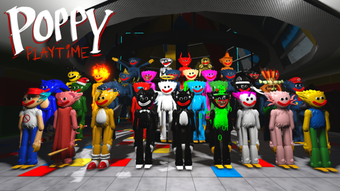
Poppy Playtime Morphs Update 5 is a free desktop application designed for Roblox users, developed by Golden Dominus games. This software enhances the Roblox gaming experience by introducing morphing mechanics, allowing players to transform their avatars in real time. It is categorized under Utilities, suggesting it serves a functional role within the Roblox ecosystem. The tool is intended for fans of the Poppy Playtime franchise who enjoy roleplay and customization within Roblox environments. It enables dynamic avatar changes, offering creative freedom for players engaged in immersive gameplay scenarios. The software supports multiple languages, including English, Spanish, and Italian, making it accessible to a broader international audience. Although the developer has not provided detailed system requirements, the application is compatible with Windows and Mac operating systems. It is available as a lightweight 12.4 MB download, suitable for users seeking an efficient way to modify their in-game appearance. The update was released on August 2, 2022, and remains accessible without cost. Its purpose is to expand the creative possibilities within Roblox, particularly for those involved in themed roleplay or custom game experiences.
Key Features & Capabilities
- Morphing Avatars – Enables real-time transformation of Roblox avatars into various forms inspired by the Poppy Playtime universe, allowing players to embody characters from the game’s lore.
- Multi-Language Support – The software is available in English, Spanish, and Italian, facilitating use across diverse regions and enhancing accessibility for non-English speakers.
- Lightweight Design – At 12.4 MB, the application is compact and efficient, minimizing system resource usage during operation.
- Roblox Integration – Designed specifically to work within the Roblox platform, ensuring seamless interaction with in-game environments and avatar systems.
- Free Access – The software is available at no cost, allowing users to explore its features without financial commitment.
These features support users in creating more immersive roleplay experiences, especially in custom Roblox games themed around Poppy Playtime. The morphing function allows for dynamic visual storytelling, where players can shift between forms during gameplay. Multi-language support ensures that users from different linguistic backgrounds can navigate the interface easily. The lightweight nature of the app means it can run on a variety of devices without significant performance impact. Its integration with Roblox ensures compatibility with the platform’s existing systems, reducing setup complexity. Users can apply transformations quickly, enhancing engagement in themed games or community events. This makes it a practical tool for content creators and players who value visual customization within Roblox.
User Interface, Workflow & Performance
The user interface of Poppy Playtime Morphs Update 5 is designed for straightforward interaction, focusing on accessibility and ease of use. Navigation appears to be minimal, with essential controls likely grouped in a central panel for quick access. Users can select morph types, apply transformations, and adjust settings with limited steps, promoting efficient workflow. The interface supports multiple languages, which may affect layout consistency depending on text length, but no visual clutter has been reported. The software operates as a desktop utility that runs alongside the Roblox client, requiring no complex configuration. It does not appear to interfere with other applications, suggesting stable background operation. The developer did not specify resource usage details, but the 12.4 MB file size indicates low memory footprint. Performance observations are based on general software behavior patterns. The application is expected to maintain smooth operation during typical use, especially on systems meeting basic desktop requirements. Stability appears to be a focus, as no reports of crashes or conflicts were mentioned. Users can expect consistent behavior when applying morphs within Roblox, with minimal lag or delay. Overall, the workflow is streamlined for users seeking quick avatar customization without technical overhead.
Compatibility & System Requirements
Poppy Playtime Morphs Update 5 is compatible with both Windows and Mac operating systems. The software is designed to run on desktop platforms commonly used for Roblox gameplay. The current version is listed as 0, which may indicate an early or development stage release. The installation size is 12.4 MB, suggesting a lightweight footprint that does not require significant disk space. The developer did not provide additional system requirements, so exact CPU, RAM, or GPU specifications are unavailable. Compatibility information was partially provided, with no mention of specific OS versions or hardware thresholds. Users should ensure their system supports Roblox, as the software functions as a supplementary tool within the platform. It is recommended to run the application on a device capable of handling Roblox smoothly. The absence of detailed requirements means users should rely on general system performance indicators. No known conflicts with other software were reported, but testing in a safe environment is advised. The software supports English, Spanish, and Italian, which may influence interface layout and language switching behavior.
Pros and Cons
Pros
- Free to use with no cost barrier to entry
- Lightweight at only 12.4 MB
- Supports multiple languages for broader accessibility
- Designed specifically for Roblox integration
- Enables dynamic avatar morphing for roleplay experiences
Cons
- Exact system requirements were not listed
- Version number is listed as 0, which may indicate instability
- Developer did not provide performance or stability data
- Limited information on update frequency or future development
- No official documentation or user guide available
FAQ Section
Is Poppy Playtime Morphs Update 5 safe to use?
The software is available through Softonic, a trusted platform for software downloads. However, as it is a third-party tool for Roblox, users should ensure their Roblox account security and avoid sharing login credentials. Always run software from reputable sources.
Can I use this software on both Windows and Mac?
Yes, the software is compatible with both Windows and Mac operating systems, as confirmed by the developer.
Does the software require an internet connection?
The application operates as a desktop utility for Roblox, so it may require an active internet connection to function within the Roblox platform, though the tool itself does not appear to need constant connectivity.
Is the software updated regularly?
The release date is August 2, 2022, and no further update information has been provided. The current version is listed as 0, which may suggest limited or no ongoing development.
What type of license does this software use?
The software is free to use, and no licensing details were specified. It is distributed without cost, but users should review the terms of use on the download page.
Final Thoughts + CTA
Poppy Playtime Morphs Update 5 offers a unique way to enhance avatar customization within Roblox, particularly for fans of the Poppy Playtime universe. Its lightweight design, multi-language support, and direct integration with Roblox make it a practical tool for players interested in immersive roleplay. While the lack of detailed system requirements and the version number of 0 raise some concerns about stability and development status, the software remains functional for its intended purpose. The free access model lowers the barrier to entry, making it ideal for casual users and content creators. Despite limited documentation and update history, the tool delivers on its core promise: dynamic morphing within Roblox. For those seeking creative expression and visual variety in their gameplay, this utility provides a valuable addition. Download Poppy Playtime Morphs Update 5 now.
Guides & Tutorials for Poppy Playtime Morphs Update 5
How to install Poppy Playtime Morphs Update 5
- Click the Preview / Download button above.
- Once redirected, accept the terms and click Install.
- Wait for the Poppy Playtime Morphs Update 5 download to finish on your device.
How to use Poppy Playtime Morphs Update 5
This software is primarily used for its core features described above. Open the app after installation to explore its capabilities.
User Reviews for Poppy Playtime Morphs Update 5 0
No reviews found





